
A reusable letter template library is a structured collection of standardized, modifiable letter formats that organizations use to produce consistent, error-free correspondence at scale. Building one correctly means fewer drafting errors, faster turnaround, and communication that holds up under legal or compliance scrutiny. The process draws on formatting standards like 1-inch margins and block layout, organizational techniques like folder-based categorization, and dynamic tools like variable field syntax. For HOA boards and property managers especially, a well-built template library is the difference between a professional notice and a letter that creates liability.
What does building a reusable letter template library require?
The foundation of any template library is a set of non-negotiable formatting standards. Industry standards specify 1-inch margins, left-aligned block formatting, and professional fonts such as Times New Roman, Arial, or Calibri at 11–12pt size. These choices are not aesthetic preferences. They signal authority and make letters readable across print and digital formats.
Before writing a single template, you need the right tools in place:
- Word processor or document generator: Microsoft Word, Google Docs, or a dedicated document assembly platform handles the base layout.
- Template management system: A shared drive, cloud folder structure, or purpose-built platform stores and organizes files.
- Version control mechanism: Edit tracking, change logs, or approval workflows prevent unauthorized edits from corrupting approved templates.
- Brand style guide: A documented reference for logo placement, font choices, color codes, and signature blocks keeps every template on-brand.
Formatting standards matter more than most organizations realize. Standardizing formatting reduces time spent on manual adjustments by 50–70% per document. That time savings compounds across hundreds of letters per year.
Pro Tip: *Start with a master "locked" template that fixes the letterhead, contact block, and footer. Users fill in the body only. This single step prevents the most common source of formatting drift.*

How do you organize and categorize your reusable letter templates effectively?
Categorization is what separates a useful library from a folder full of files nobody can find. Effective template systems organize templates into at least 15 core types to cover most organizational needs. That structure cuts time-to-first-draft from 30+ minutes to under 5 minutes. The speed gain comes entirely from not starting from scratch.
A practical category structure for most organizations looks like this:
- Compliance and enforcement: Violation notices, warning letters, fine notices, hearing invitations
- Administrative: Welcome letters, meeting notices, board announcements, policy updates
- Resident relations: Complaint responses, maintenance notifications, approval letters
- Legal and formal: Demand letters, cease-and-desist notices, legal disclosures
- Financial: Assessment notices, late payment reminders, lien warnings
Beyond categories, naming conventions determine whether people actually use the library. A file named "ViolationNotice_Parking_v3_2026.docx" is immediately useful. A file named "Letter_Final_FINAL2.docx" is not. Use a consistent naming format: category, subcategory, version number, and year.
Folder structure should mirror the category list above. Each top-level folder holds subcategories, and each subcategory holds the current approved version plus an "Archive" subfolder for retired versions. Tagging systems in platforms like Google Drive or SharePoint add a second retrieval layer for teams managing large libraries.
Limiting color palettes to 5–7 colors and using only 2–3 font sizes prevents design drift across communications. Design drift is what happens when each team member "improves" a template slightly until the library looks like it was built by ten different organizations.
Pro Tip: *Assign one person as the template librarian. That person approves new templates, archives old ones, and enforces naming conventions. Without ownership, libraries decay within months.*
What are the best practices for dynamic content and version control?
Static templates require someone to manually find and replace every variable. Dynamic templates do that work automatically. The standard approach uses variable field syntax: placeholders like `{{resident_name}}`, `{{property_address}}`, and `{{violation_date}}` that link to a central data source or merge field system.
Variable systems linked to central data sources reduce manual copy-pasting errors by 15–20%. That reduction matters most in compliance contexts, where a wrong name or date on a legal notice can void the document entirely.
Building dynamic templates well requires four steps:
- Identify every variable field in the letter: names, dates, addresses, dollar amounts, and any context-specific language.
- Define conditional logic for sections that only appear in certain situations. A late payment reminder, for example, might include a lien warning paragraph only when the balance exceeds a set threshold.
- Link fields to a data source such as a spreadsheet, CRM, or property management platform so variables populate automatically.
- Test every variable path before approving the template. Run the template with edge-case data: long names, missing fields, and maximum-length addresses.
Version control is the other half of this equation. Version control with approval gates prevents use of outdated or unapproved templates and reduces compliance risks. The practical implementation is straightforward: no template enters the active library without a review sign-off. Every change creates a new version number. Old versions move to the archive folder immediately.
AI can generate letter body content effectively, but human-vetted templates must govern the structure. AI fills in the words; the approved template controls the format, legal language, and institutional tone.
Pro Tip: *Add a visible version number and approval date in the document footer of every template. Anyone opening the file immediately knows whether they have the current version.*
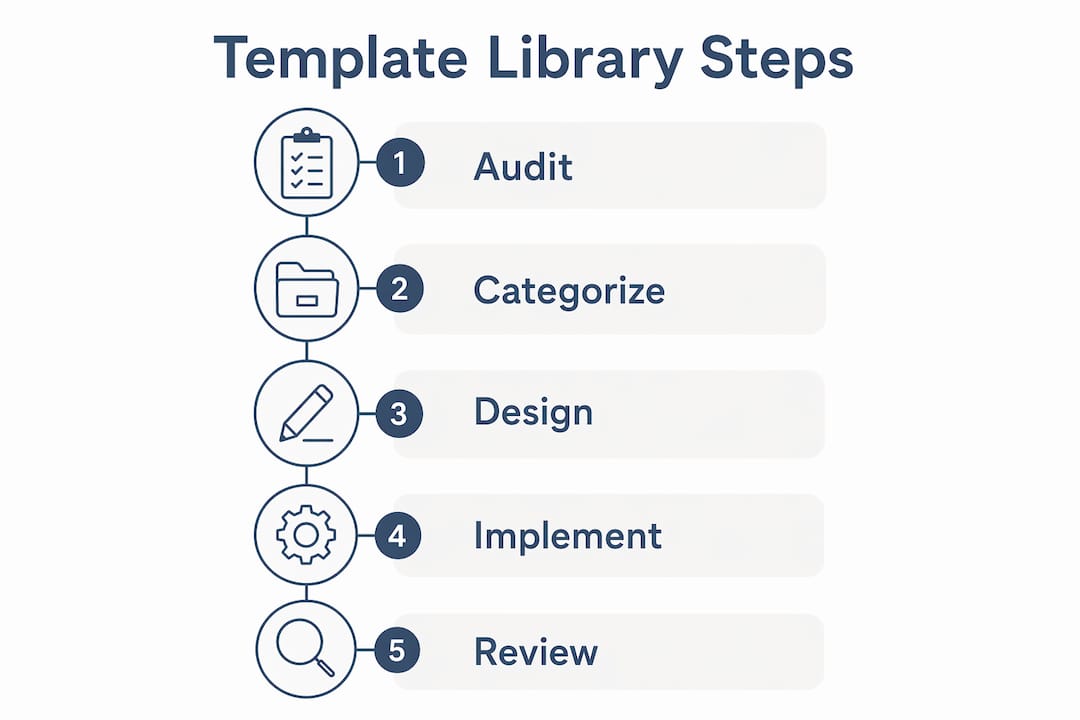
Step-by-step process to build and maintain your template library
Building the library follows a clear sequence. Skipping steps creates the exact problems the library is meant to solve.
- Audit existing letters. Collect every letter your organization sends. Identify duplicates, inconsistencies, and gaps. This audit defines your category list.
- Create the master base layout. Set margins, fonts, header, and footer. Lock these elements so users cannot edit them. This is your locked master template.
- Build category templates from the base. Copy the base layout for each letter type. Add the appropriate body structure, variable placeholders, and any conditional sections.
- Test across formats and devices. Export each template as a PDF and open it on both desktop and mobile. Check that fonts render correctly, margins hold, and variable placeholders display as expected in Word and Google Docs.
- Run a pilot with a small team. Have two or three people use the templates for real letters. Collect feedback on usability, missing variables, and confusing instructions.
- Publish to the shared library. Move approved templates into the organized folder structure. Communicate the naming conventions and retrieval process to all users.
- Schedule quarterly reviews. Set a calendar reminder every three months to check for outdated language, regulatory changes, or new letter types that need templates.
Common mistakes to avoid:
- Skipping the audit step and building templates that duplicate existing files
- Allowing users to save personal copies outside the shared library
- Forgetting to archive retired templates, which creates confusion about which version is current
- Building templates without testing variable fields, which leads to broken merge output
Simple folder-based libraries using blank starter files outperform complex design systems for internal communications. The goal is adoption, not elegance. A library nobody uses solves nothing.
The table below summarizes the key phases and what each one produces:
| Phase | Action | Output |
|---|---|---|
| Audit | Collect and review all existing letters | Category list and gap analysis |
| Base layout | Set formatting standards and lock core elements | Master template file |
| Template creation | Build category templates with variables | Active template library |
| Testing | Validate across formats and use cases | Approved, error-free templates |
| Maintenance | Quarterly review, archive, and update | Current, compliant library |
Key Takeaways
A reusable letter template library succeeds when it combines locked formatting standards, clear categorization, dynamic variable fields, and formal version control into one maintained system.
| Point | Details |
|---|---|
| Lock core formatting | Fix margins, fonts, and letterhead in a master template to prevent design drift. |
| Categorize by use case | Organize at least 15 template types so teams find the right letter in under 5 minutes. |
| Use variable fields | Link placeholders to a data source to cut copy-paste errors by 15–20%. |
| Enforce version control | Require approval sign-offs and archive old versions to maintain compliance. |
| Review quarterly | Schedule regular audits to retire outdated templates and add new ones as needs change. |
Why simple systems beat complex ones every time
The most common mistake I see organizations make is building a template library that looks impressive but nobody actually uses. They invest weeks in elaborate design systems, color-coded folders with subfolders, and multi-step approval chains. Then six months later, staff are back to emailing each other Word documents and starting from scratch.
The copy-paste and fill-in-the-blank approach is not a compromise. It is the right answer for most organizations. People adopt tools that feel faster than the alternative. If pulling up a template takes more steps than opening a blank document, the template loses every time.
What I have found actually works is a single shared folder, a locked base layout, and a naming convention that anyone can learn in five minutes. The letter templates in organizations that get used consistently are the ones that require the least explanation. Version control matters enormously, but it does not need to be complicated. A version number in the file name and a one-line change log in the document footer is enough for most teams.
The one area where I push back on simplicity is variable fields. Skipping dynamic variables because they seem technical is a mistake that costs far more time than it saves. A template with `{{resident_name}}` and `{{violation_date}}` takes an afternoon to set up correctly. It then saves hours every month and eliminates the category of errors that come from manually editing a letter and missing a field.
Design drift is the slow killer of template libraries. It starts with one person changing a font "just this once" and ends with a library where every template looks slightly different. Limiting fonts to two choices and colors to a defined palette, as design pattern research confirms, is not a creative constraint. It is what keeps the library functional a year from now.
> *— Blake*
How Hoaletterai supports your letter template library
HOA boards and property managers deal with a specific, high-stakes category of letters: compliance notices, fine warnings, hearing invitations, and legal disclosures. Getting these wrong has real consequences.

Hoaletterai provides ready-made, state-compliant HOA letter templates that cover the full range of enforcement and administrative correspondence. Each template includes built-in formatting standards, state-specific language options, and a one-page preview before sending. The platform handles USPS mailing directly, so boards skip the print-and-mail step entirely. For organizations building or expanding their compliance letter library, Hoaletterai's warning letter template is a practical starting point that already meets the formatting and legal standards this article describes.
FAQ
What is a reusable letter template library?
A reusable letter template library is a structured collection of pre-formatted letter files organized by category and maintained with version control. It allows organizations to produce consistent correspondence quickly without drafting from scratch each time.
What fonts and margins should letter templates use?
Professional letter templates use 1-inch margins, left-aligned block formatting, and fonts such as Times New Roman, Arial, or Calibri at 11–12pt size. These formatting standards reduce manual adjustment time by 50–70% per document.
How many template categories does an organization need?
Most organizations need at least 15 core template categories to cover common communication scenarios. That number covers compliance, administrative, resident relations, legal, and financial letter types without significant overlap.
What is variable field syntax in letter templates?
Variable field syntax uses placeholders like `{{client_name}}` or `{{date}}` that link to a data source and populate automatically when the template is used. Linking variables to central data reduces manual errors by 15–20% compared to copy-paste editing.
How often should a template library be reviewed and updated?
A template library should be reviewed at least quarterly. Reviews catch outdated regulatory language, retire obsolete templates, and add new formats as organizational needs change. Version control with approval gates keeps the library accurate between scheduled reviews.