
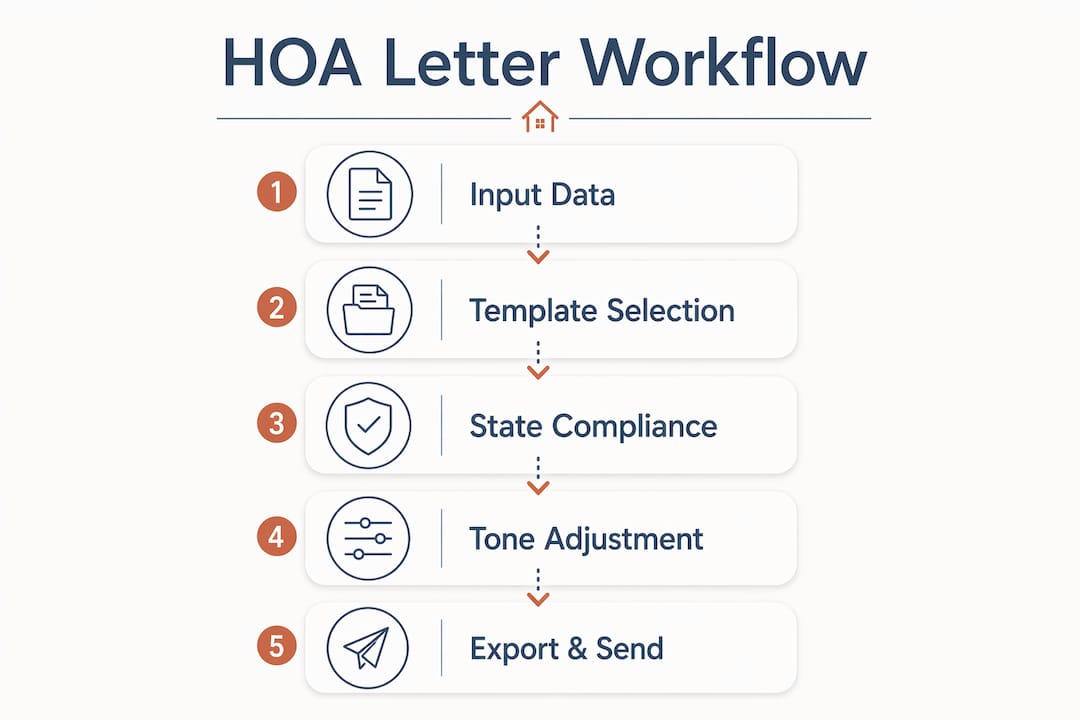
The fastest way to automate HOA letter generation today is to use a state-aware, template-driven tool that handles tone selection, statute placeholders, preview, and USPS mailing in one pass. You need five inputs to generate a compliant letter right now:
- Community name and letterhead details
- Rule or CC&R reference (section number or plain-language description)
- Recipient name and address
- Incident date and description
- Desired tone (neutral, diplomatic, or judicial)
Once those are in, the workflow is straightforward:
- Pick a template (violation, fine, hearing decision, welcome, meeting notice)
- Enter the facts
- Select tone
- Preview the one-page draft, including deadline dates and rule citations
- Download as PDF or Word, email it, or send via USPS
Hoaletterai supports all five steps with state-aware placeholders and a preview-before-export workflow, so you can review the exact letter before it leaves your hands. No account is required to run a free preview.
Table of Contents
- What do automated HOA letter tools actually do?
- How does the workflow go from incident to mailed notice?
- What compliance checks should you run before sending automated letters?
- What should you expect on cost and setup time?
- Which admin features save the most time for property managers?
- How do tone controls help you keep homeowner relationships intact?
- Why does HOA Letter AI stand out for boards and property managers?
- Key Takeaways
- A practitioner’s note on rolling out letter automation
- Hoaletterai makes state-aware letter generation fast and low-risk
- Useful sources for verifying state rules and templates
What do automated HOA letter tools actually do?
The core value is not just speed. It is the combination of accuracy checks, state-specific language, and delivery options that boards would otherwise have to assemble from three or four separate tools.

Template library. A solid tool covers the full range of board communications: violation notices, fine letters, hearing decisions, architectural approvals and denials, assessment notices, meeting agendas, and welcome letters. Free template categories from HOA management resources include fine schedules, delinquent assessment notices, and lien-related forms — the breadth of what boards actually send.
State-aware text and statute placeholders. Rather than generic language, automated tools insert state-specific notice periods, fine limits, and statute references as editable placeholders. You confirm the citation before sending; the tool gives you the right starting point.
Tone controls. Most boards need more than one register. A first-notice parking violation calls for a different tone than a hearing decision on a contested fine. Tools that generate multiple tone variants per draft let you pick the one that fits your community’s posture without rewriting from scratch.
Export and delivery options. PDF and Word downloads cover most needs. USPS mailing fulfillment handles formal notices where proof of delivery matters.
Batch operations. CSV import lets property managers send notices to dozens of residents in one run. Multi-community management means one account can handle separate letterheads, rule sets, and officer signatures for each community.
Recordkeeping and security. Archive-ready formatting, printable letterheads, and signature block options support enforcement records. On the security side, check for data encryption, role-based access controls, and audit trails before committing to any platform. Homeowner data is sensitive; a tool’s security practices should be publicly documented.
How does the workflow go from incident to mailed notice?
A realistic automation run for a single violation letter takes under ten minutes from intake to send. Here is how each stage breaks down:
- Log the incident (1–2 minutes): note the date, location, and rule reference. A photo or written description is enough to start.
- Choose a template (under 1 minute): select from violation, fine, hearing, or another category. The template pre-fills the structure.
- Enter facts and select tone (2–3 minutes): fill in recipient details, incident specifics, and the CC&R section. Choose neutral, diplomatic, or judicial tone.
- Auto-insert state placeholders (automatic): the tool populates notice periods, fine caps, and statute references for your state. You review, not write, these.
- Preview the draft (1–2 minutes): the one-page preview shows deadline dates, the specific rule text placeholder, the signature block, and the letterhead. If anything looks off, edit before export.
- Choose delivery (under 1 minute): download PDF, export to Word, send by email, or route to USPS mailing.
- Log and archive (1 minute): save the sent letter to your enforcement record. A good tool timestamps and stores the output automatically.
For batch runs, the process compresses further. Upload a CSV with recipient names, addresses, and incident details. The tool maps each row to the selected template, generates individual letters, and queues them for delivery. A property manager handling 20 violation notices can finish a batch in the time it used to take to draft one letter manually. CRM or property management system integrations can pre-populate the CSV fields, cutting data entry to near zero.
What a solid preview should show before you send:
- Correct deadline date calculated from the incident date and state notice period
- Specific rule or CC&R section text (not a generic placeholder like “[RULE]”)
- Signature block matching the correct officer or manager role
- Letterhead with community name, address, and contact information
What compliance checks should you run before sending automated letters?
Automation speeds up drafting. It does not replace the board’s responsibility to verify what goes out. A few checks prevent the kind of procedural errors that can invalidate a notice or turn a routine violation into a contested dispute.
- Verify state notice requirements. Fine limits, notice periods, and hearing rights vary by state and sometimes by community type. Use the tool’s state placeholders as a first draft, then confirm the exact statute against your state’s HOA statutes or the HOA violation laws by state reference before sending.
- Check your CC&Rs. The template must mirror your community’s specific procedural steps: how many days’ notice before a hearing, whether a written appeal is allowed, and what the fine schedule looks like. A state-compliant letter that contradicts your CC&Rs is still a problem.
- Avoid legal conclusions. Keep wording factual: describe what was observed, cite the rule, and state the required action. Do not characterize intent, make protected-class references, or assert legal liability.
- Include a “not legal advice” disclaimer on any letter that touches contested fines, lien filings, or hearing decisions. A short line at the bottom is enough.
- Know when to call an attorney. Complex disputes, lien filings, ambiguous CC&R language, or any situation where a homeowner has retained counsel all warrant legal review before you send anything.
Pro Tip: Use the automation tool’s state placeholders as a first pass only. Have the board secretary or property manager confirm the exact citation against your state’s current statutes before the letter goes out. Statutes change; a tool’s database may lag a recent amendment.
What should you expect on cost and setup time?
Pricing for HOA letter automation generally follows three models:
- Per-letter pricing: pay only for what you generate. Works well for small self-managed boards with low letter volume.
- Subscription (per-community or per-user): a flat monthly or annual fee covering unlimited or high-volume generation. Better for property management firms running multiple communities.
- Tiered feature plans: base tiers cover core templates and PDF export; premium tiers add USPS mailing fulfillment, state-citation verification, batch CSV, and priority support.
Setup is faster than most boards expect. Account creation and template mapping typically take an hour or less. Importing community data (letterhead, officer names, common rule citations) and running a test letter adds another hour. Training one staff member to manage the workflow usually takes a single session.
Where free previews fit in: most tools, including Hoaletterai, let you preview a generated letter without creating an account. That preview is the right place to evaluate whether the output matches your community’s standards before you pay anything. Run a test letter for your most common violation type and check the state placeholder, tone, and formatting.
Cost drivers to watch: USPS mailing fulfillment adds a per-letter cost on top of any subscription. State-citation verification features and premium support tiers push subscription prices up. For most small boards, a per-letter or entry-level subscription covers everything needed.
Which admin features save the most time for property managers?
The efficiency gains for property managers come from three areas: batch operations, integrations, and tracking.
CSV import and batch sending. Required fields typically include recipient name, mailing address, unit number, incident date, and rule reference. A well-designed tool flags missing or malformed rows before generating letters, so you catch errors before they reach homeowners.
Integration points worth checking:
- Property management systems (for pre-populated resident data)
- Community portals (for digital delivery and resident acknowledgment)
- CRM exports (for tracking communication history per resident)
Each integration reduces manual data entry and keeps your enforcement record consistent across platforms.
Tracking and audit trails. Delivery receipts, USPS tracking numbers, and compliance letter tracking logs are what protect a board when a dispute reaches a hearing. A searchable archive by resident, date, or violation type makes pulling records fast.
Template management. Save community-specific defaults once: letterhead, common rule citations, officer signatures. Every subsequent letter for that community starts pre-configured.
| Admin Feature | What It Automates |
|---|---|
| CSV batch import | Multi-recipient letter generation in one run |
| Property management integration | Pre-populated resident and unit data |
| Delivery tracking | USPS confirmation and response logging |
| Template defaults | Community letterhead and rule citations saved per community |
| Role-based access | Controls who can draft, approve, and send letters |
How do tone controls help you keep homeowner relationships intact?
The right tone does real work. A first-notice violation letter sent in a judicial register can put a homeowner on the defensive before they have had a chance to respond. That escalates disputes that a neutral or diplomatic tone might have resolved in one exchange. Research on resident satisfaction consistently shows that how a message is delivered shapes how it is received, often as much as the message itself.
When to use each tone:
- Neutral: standard first notices, meeting announcements, architectural decisions. Factual, no emotional charge.
- Diplomatic: situations where the homeowner has a history of compliance, or where the violation is minor and likely unintentional. Acknowledges the relationship before stating the issue.
- Judicial: formal hearing decisions, repeated violations, or notices that may precede enforcement action. Precise, procedural, no softening.
Template best practices that reduce conflict:
- Open with a short first paragraph stating the issue plainly (one or two sentences)
- Body: factual description with the date, location, and specific rule citation
- Close with clear next steps, a deadline, and contact information for questions
Include escalation steps in your templates so homeowners see the full process: first notice, reminder, fine, hearing. Transparency about what comes next reduces the sense that enforcement is arbitrary.
Pro Tip: Generate two or three tone variants for the same letter and read them aloud before picking one. The version that sounds like your board’s actual voice, not a legal document or a form letter, is usually the one homeowners respond to best. Log which tone you used for each case so you can track whether escalation rates differ by register.
Why does HOA Letter AI stand out for boards and property managers?
Hoaletterai is built around the specific operational needs of HOA boards and property managers, not generic document generation.
- State-aware language and rule-citation placeholders reduce the manual checking that slows down routine notices. The tool surfaces the right statute reference for your state so you are editing, not researching.
- Fast preview and export to PDF or Word, plus USPS mailing for formal notices, means you do not need a separate mailing service for enforcement letters.
- Archive-ready output with consistent formatting supports enforcement records and meeting minutes that hold up at hearings.
- Template coverage spans the full range of board communications: violation notices, landscaping violations, noise complaints, parking notices, unauthorized modifications, and more.
- Support and onboarding resources help boards and property managers get to their first sent letter quickly, without a steep learning curve.
HOA Letter AI provides state-specific language and built-in error checks to reduce common letter errors and help boards stay consistent with community rules and notice requirements.
Key Takeaways
Automating HOA letter generation cuts drafting time to minutes while improving consistency, state compliance, and record-keeping across every notice type.
| Point | Details |
|---|---|
| Five inputs are enough | Community name, CC&R reference, recipient, incident date, and tone are all you need to generate a compliant draft. |
| Preview before you send | Always review the one-page preview for correct deadlines, statute placeholders, and signature block before exporting or mailing. |
| Verify state citations manually | Use automated state placeholders as a starting point, then confirm the exact statute against current state law before the letter goes out. |
| Pilot on low-stakes notices first | Test the workflow on welcome letters or meeting notices before using automation for fines or lien-related correspondence. |
| Hoaletterai covers the full workflow | From template selection and tone control to PDF export and USPS mailing, Hoaletterai handles the complete letter generation process in one tool. |
A practitioner’s note on rolling out letter automation
The boards that get the most out of automation are not the ones with the most sophisticated setups. They are the ones that assign clear ownership from day one.
Decide before your first batch run who reviews drafts, who approves the final version, and who archives the sent letter. Without that, automation creates a new problem: letters go out faster, but accountability gets blurry. A simple rule works: one person drafts, one person confirms the state citation, one person sends. Log every notice with a timestamp.
Start with low-stakes letters. Welcome letters, meeting notices, and architectural approvals are the right place to validate your defaults: does the letterhead look right? Is the signature block pulling the correct officer name? Does the tone match what your board actually sounds like? Fix those details before you run a batch of violation notices.
The change management piece is smaller than most boards expect. Once a board member or manager sees a compliant, formatted letter generated in under five minutes, the adoption question answers itself. The harder conversation is usually about who has authority to send, not whether the tool works.
Hoaletterai makes state-aware letter generation fast and low-risk
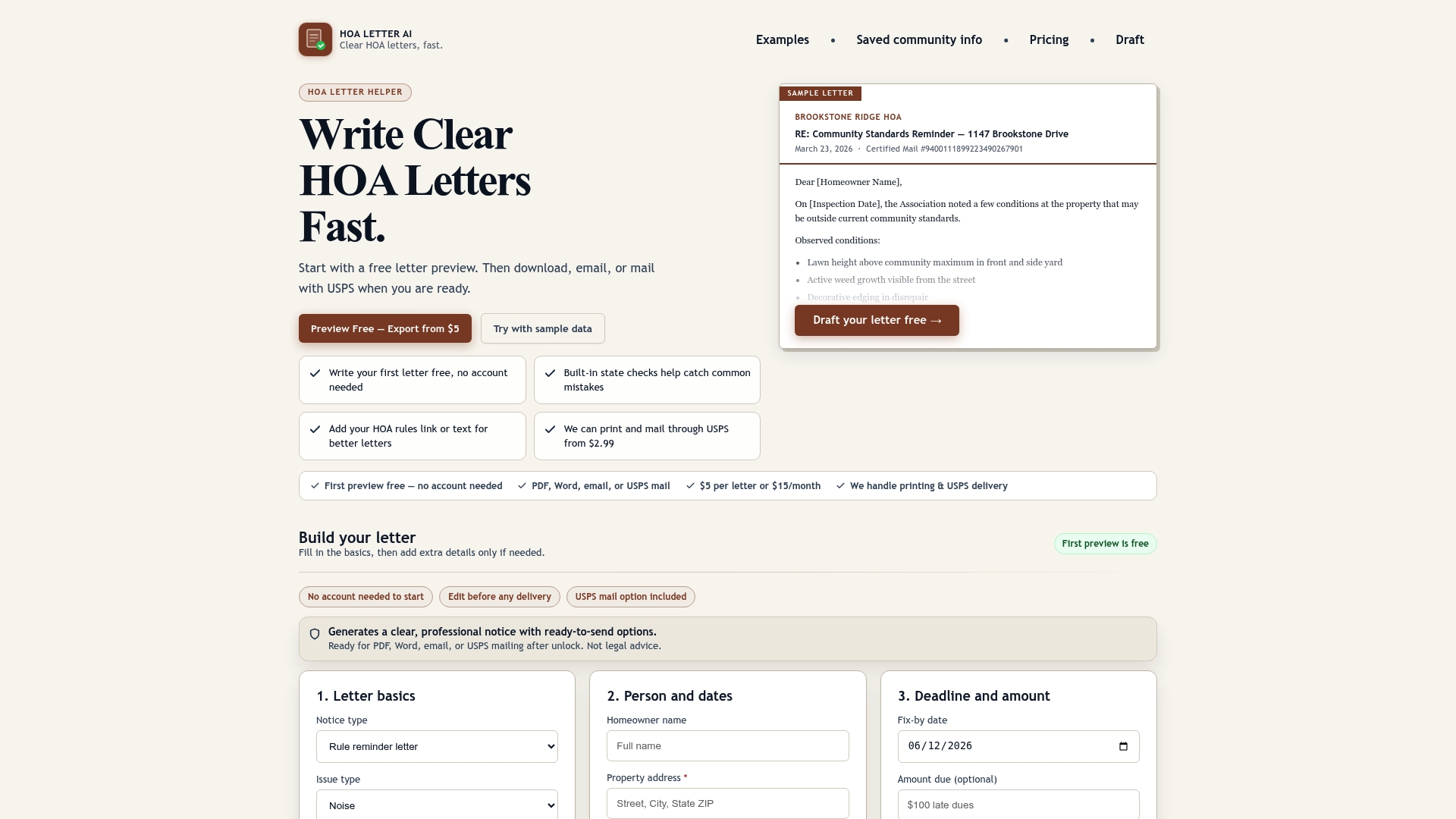
Drafting a compliant HOA notice used to mean pulling up a template, cross-referencing your state’s statutes, adjusting the tone for the situation, and formatting everything before it was ready to send. Hoaletterai compresses that into a single workflow. You enter the facts, pick a tone, and get a preview-ready letter with state-specific language already in place. No account is required to see exactly what the output looks like before you commit.
For boards handling common violations, the noise complaint template and the parking violation letter are good starting points. Both include state-aware placeholders and export to PDF or Word in one click. USPS mailing is available for formal notices that need proof of delivery.
Generate a free preview now at hoaletterai.com and see the full output before you send a single letter.
Useful sources for verifying state rules and templates
Before finalizing any automated letter, cross-check against primary sources. These are the most reliable places to verify citations, review template options, and confirm procedural requirements:
- HOA violation laws by state: Hoaletterai’s state-law reference page covers notice requirements and fine rules by state. Use it to confirm that the statute placeholder in your draft matches current law.
- Compliance letter formatting guide: Covers archive-ready formatting, printable letterhead standards, and signature block requirements for official records.
- Tracking compliance letter responses: Practical guidance on logging sent notices, tracking homeowner responses, and building an enforcement record that holds up at hearings.
- Standardized compliance letter guide: Explains when to use a standardized template versus a custom draft, and what elements make a compliance letter procedurally sound.
- Your state’s HOA statutes (primary source): Always verify notice periods, fine caps, and hearing rights directly against your state’s current statutes. State law changes; no tool’s database is a substitute for the primary source.
- Your CC&Rs: The governing document for your community is the final authority on procedural steps. Any automated letter must align with your CC&Rs, not just state law.
This article is general information, not legal advice. Confirm current notice requirements and fine rules with your state’s statutes or a qualified HOA attorney before sending enforcement letters.