
The most defensible approach to community association notice response tracking is a single, exportable record for every notice that combines the versioned template, a timestamped delivery-event log with carrier proof, and the homeowner’s response. Boards and property managers who maintain that three-part record can prove delivery, demonstrate fair enforcement, and survive a legal challenge without scrambling for paperwork.
Here is the minimum evidence you need for every notice:
- Template name and version (e.g., “Parking-Violation-v2.1”)
- CC&R or rule citation referenced in the notice
- Delivery method (USPS certified mail, email with preference on file, resident portal)
- Send timestamp (date and time, not just date)
- Carrier receipt or tracking number (USPS tracking number, certified-mail receipt, or server delivery log)
- Name of the user who sent the notice
- Homeowner acknowledgment or response timestamp and summary
California’s Davis-Stirling Act sets the most detailed state-level standard for this, and the IRS’s own voluntary compliance letter guidance shows the same logic at the federal level: standardized templates plus retained correspondence are the foundation of any defensible administrative record. HOA Letter AI automates versioning and produces exportable evidence packets, which removes the biggest manual bottleneck in this process.
Key Takeaways
A defensible community association notice response tracking program requires three things at minimum: a versioned template snapshot, a carrier-level delivery receipt, and a logged homeowner response — all exportable in a single audit packet.
| Point | Details |
|---|---|
| Capture delivery preferences first | Document each homeowner’s preferred channel before sending notices; this determines what proof you must collect. |
| Version every template | Store the exact text used at send time; a changed template with no version record is a dispute waiting to happen. |
| Use evidence-capable channels | USPS certified mail and portal acknowledgment buttons produce carrier-side proof; plain email read receipts do not. |
| Build exportable evidence packets | A PDF plus CSV export for each enforcement action lets counsel review a case in minutes, not hours. |
| HOA Letter AI automates the record | State-aware templates, USPS mailing integration, and delivery-event logging produce the audit packet automatically. |
Table of Contents
- What U.S. notice-delivery rules require you to prove
- The required evidence fields for every notice and response
- How to run a notice workflow from send to close
- Which delivery channels actually produce usable proof
- A minimal tracking spreadsheet you can copy today
- How to build an audit-ready evidence packet
- KPIs and dashboards that tell you if your program is working
- Common mistakes that create legal exposure
- Why state-aware templates and delivery tracking reduce disputes
- What I would implement this month if I were running this program
- HOA Letter AI puts this workflow into a single tool
- Sources
What U.S. notice-delivery rules require you to prove
State notice statutes and your governing documents set the required delivery methods and timing. Getting those wrong does not just create a procedural headache — it can void an enforcement action entirely.
The most detailed state framework is California’s Davis-Stirling Act. Under rules that took effect January 1, 2022, California associations must request each member’s preferred delivery method — email, first-class mail, or both — and then honor that preference for all official notices. That preference request itself becomes a record you need to keep. Other states follow similar patterns: written notice is almost universally required for violation and hearing notices, and most statutes specify a minimum cure period (commonly 14–30 days) before fines or further action.
What changes by state is what counts as proof:
- Physical mail states: Some statutes still require first-class or certified mail for enforcement notices, meaning a USPS tracking number or certified-mail receipt is the only acceptable proof.
- Electronic-notice states: Many states now permit email or portal delivery, but only when the homeowner has a documented opt-in preference on file. Without that preference record, an email notice may be legally undeliverable.
- Governing-document requirements: Even in permissive states, your CC&Rs or bylaws may impose stricter delivery rules than state law. Always check both layers.
The practical implication: your delivery-preference record is not just a courtesy. It is the document that determines which evidence you need to collect. A homeowner who never submitted a preference may require physical mail regardless of what your portal shows.
Pro Tip: Create a one-page “Delivery Preference Confirmation” form and collect it from every homeowner at move-in and annually at the annual meeting. Store it in the homeowner’s file and link it to every notice record. If a homeowner later disputes delivery, you can show the preference they selected and the channel you used to honor it.
Understanding why HOA letters require a documented response matters here too — the homeowner’s right to respond is tied directly to the delivery method you used.
The required evidence fields for every notice and response
Every notice record needs ten core fields to be defensible. Miss one and you may have a gap an attorney can exploit.
| Field | Why it matters | What proves it |
|---|---|---|
| Notice ID | Unique reference for cross-linking records | Auto-generated or sequential number |
| Template name + version | Proves consistent, approved language was used | Version-stamped PDF of template at send time |
| CC&R / rule citation | Links the violation to governing documents | Text pulled from current CC&Rs |
| Author / sender | Establishes who authorized and sent the notice | User login record or signature |
| Send timestamp | Starts the cure-period clock | Server log, platform record, or USPS postmark |
| Delivery method | Determines what proof is required | Preference record on file |
| Provider status / receipt | Confirms the notice reached the homeowner | USPS tracking page, email delivery log |
| Tracking or certified-mail number | Carrier-level proof of delivery | USPS certified-mail receipt |
| Homeowner response timestamp | Records when the homeowner replied or acknowledged | Portal click log, email reply, written letter date |
| Response summary | Documents what the homeowner said or did | Brief text note or attached document |
The types of standardized notice templates your association uses should map directly to this data model — each template type may trigger slightly different evidence requirements.
Pro Tip: Attach photos and carrier-receipt PDFs directly to the notice record using a consistent naming convention (see Section 7). Store attachments in a folder structure that mirrors your Notice ID, not in a general “photos” dump. Never store homeowner response content in a shared folder accessible to all staff — limit access to the enforcement team and board to stay on the right side of privacy expectations.
How to run a notice workflow from send to close
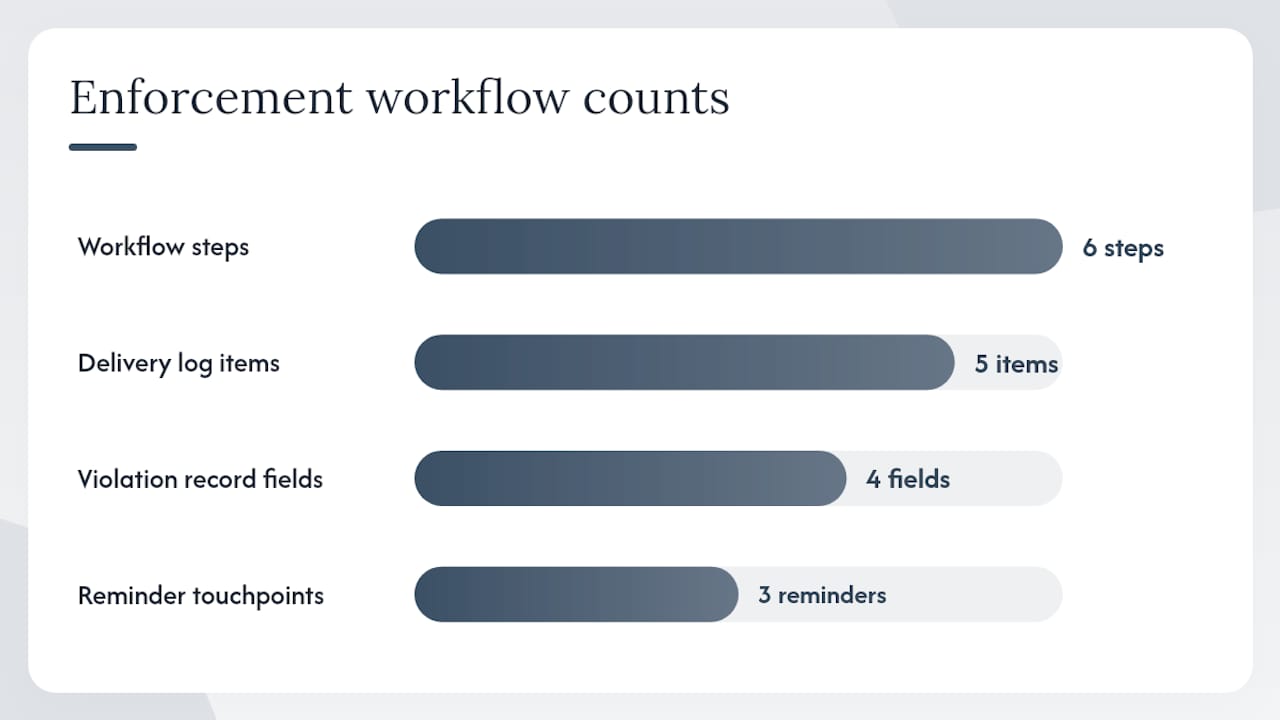
A reliable enforcement workflow has six steps: identify the violation, get board approval if required, send the notice, record the delivery event, monitor the cure period, then escalate or close. That sequence, applied consistently, is what separates a defensible enforcement program from an ad hoc one.
Here is how each step works in practice:
- Identify and document the violation. The inspector or manager records the violation type, the relevant CC&R section, photos with timestamps, and the unit address. This becomes the trigger record.
- Draft and approve the notice. Use the approved template for that violation type. If your governing documents require board approval before sending a formal notice, log the approval vote and date. For routine first notices, many boards delegate approval to the manager.
- Send through an evidence-capable channel. Choose the channel that matches the homeowner’s delivery preference on file. USPS certified mail, an e-notice platform with delivery logging, or a resident portal with an acknowledgment button all produce usable proof. Plain email without a delivery log does not.
- Record the delivery event immediately. Log the send timestamp, the provider status (delivered, attempted, returned), the tracking or certified-mail number, and the name of the sender. Attach the carrier receipt or server confirmation.
- Monitor the cure period and send reminders. A typical cure period runs a few weeks. A workable reminder schedule: initial send, a mid-period courtesy reminder, a final notice near the cure deadline, then escalation if uncured. Set a calendar trigger or use platform automation so reminders do not fall through the cracks.
- Escalate or close. If the homeowner cures the violation, log the close date and the evidence of compliance (photo, written confirmation). If uncured, log the escalation trigger, the hearing offer, and the board’s next action. Every one of these events gets a timestamp.
Pro Tip: Classify incoming homeowner responses into three tiers before you log them: factual questions (need an answer), substantive disputes (need board review), and compliance confirmations (close the record). A three-tier triage model keeps your response queue from stalling and ensures disputes get routed to the right person fast.
The cure-period reminder schedule above is a starting point. Some states or governing documents require specific notice intervals before fines begin — confirm the exact timing with counsel before you set your SLA.
Which delivery channels actually produce usable proof
Not all delivery methods are equal when it comes to evidence. The channel you choose determines what you can prove in a dispute.
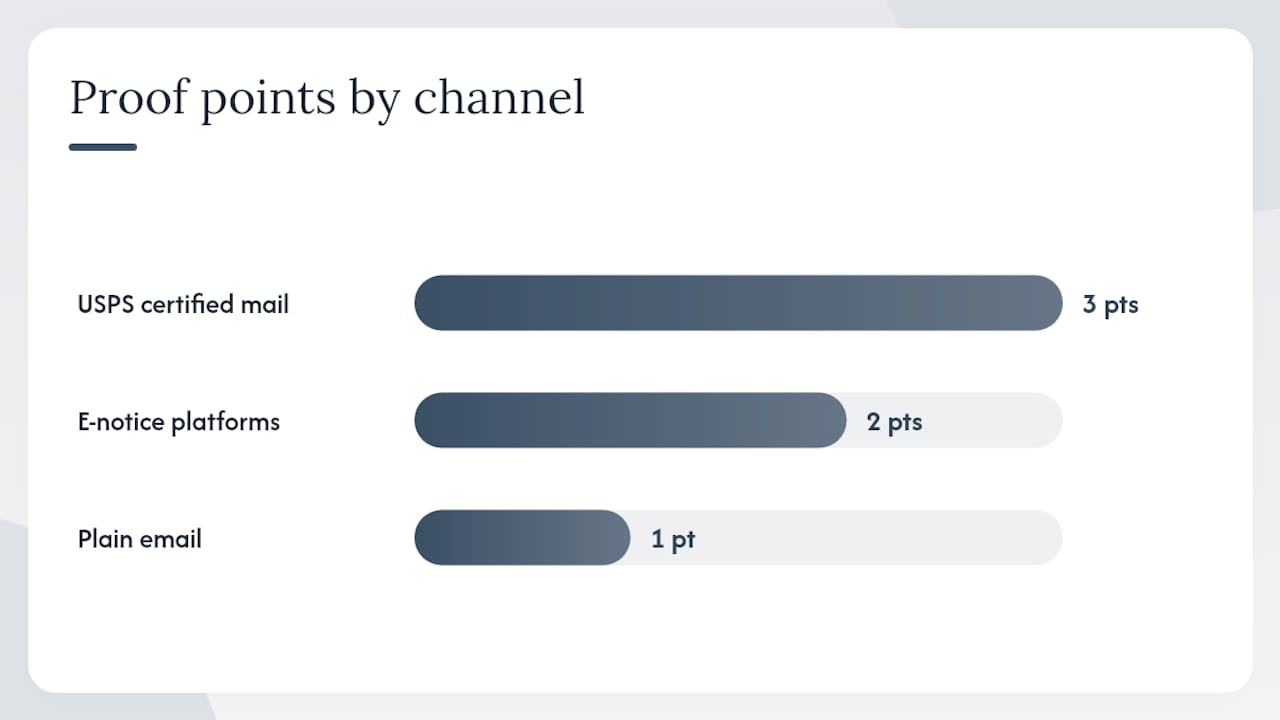
USPS certified mail remains the gold standard for enforcement notices. It produces a signed receipt, a USPS tracking number, and a postmark — three independent proof points. The downside is cost and turnaround time (typically 2–5 business days). For formal violation notices and hearing notices, certified mail is worth both.
E-notice platforms and resident portals with acknowledgment buttons produce server-side delivery logs and click timestamps. Research on community response grids confirms that internet and mobile systems can form reliable channels for contacting residents and coordinating responses — but only when the homeowner has opted in and the platform logs the event server-side, not just client-side.
Plain email is the weakest option. Email read receipts are client-generated and can be blocked or faked. A delivery receipt from your mail server confirms the message reached the recipient’s server, not that the homeowner opened or received it. Use email only when state law and your governing documents explicitly permit it and the homeowner has a documented preference on file.
SMS is useful for reminders but rarely sufficient as primary delivery proof for formal notices.
Selection checklist for your channel mix:
- Does the homeowner have a documented delivery preference for this channel?
- Does the channel produce a server-side or carrier-side delivery record?
- Can you export that record as a PDF or CSV for an audit packet?
- Does state law and your governing documents permit this channel for this notice type?
- What is the cost per notice at your community’s volume?
Pro Tip: For communities with more than 50 units, an integrated SaaS platform that combines letter generation with USPS mailing fulfillment and delivery-event logging cuts the manual steps from roughly six to two: draft and send. The platform handles the rest and produces the audit export automatically.
A minimal tracking spreadsheet you can copy today
You do not need software to start. A well-structured spreadsheet covers the basics and gives you an exportable record from day one.
Create these columns in Google Sheets or Excel:
| Column | Type | Example formula or value |
|---|---|---|
| Notice ID | Text | NOV-2025-0047 |
| Address / Unit | Text | 14 Oak Lane, Unit 3B |
| Homeowner name | Text | Jane Smith |
| Template name + version | Text | Parking-Violation-v2.1 |
| CC&R section | Text | Section 4 |
| Send date/time | DateTime | 2025-06-12 |
| Delivery method | Dropdown | USPS Certified |
| Provider status | Dropdown | Delivered |
| Tracking / certified number | Text | 9400111899 |
| Proof link | URL | [Drive link to receipt PDF] |
| Sender | Text | M. Torres |
| Response date/time | DateTime | 2025-06-18 |
| Response summary | Text | Homeowner confirmed removal by 6/18 |
| Cure deadline | Formula | =F2+14 (send date + cure days) |
| Days remaining | Formula | =N2-TODAY() |
| Escalation status | Dropdown | Open / Cured / Escalated |
| Audit notes | Text | Certified receipt attached |
A few formulas worth adding:
- Cure deadline:
=F2+14(replace 14 with your governing-document cure period) - Days remaining:
=N2-TODAY()— apply conditional formatting to flag cells below 3 days in red - Alert flag:
=IF(O2<0,"OVERDUE",IF(O2<=3,"URGENT","OK"))— gives a plain-text status in a separate column
Spreadsheet best practices:
- Lock the header row and protect the template-name and CC&R-citation columns from editing after a notice is sent.
- Keep a separate “Templates” tab with the exact text of each approved template version. Never overwrite a version — add a new row with a new version number.
- Export to PDF and CSV at the end of each month and store both in a dated folder. The IRS’s own guidance on standardized correspondence treats retained template versions and correspondence records as the backbone of any administrative compliance program — the same logic applies here.
How to build an audit-ready evidence packet
An evidence packet is the complete file for a single enforcement action: everything a board attorney or mediator would need to evaluate the case without asking follow-up questions.
A complete packet contains:
- Template version PDF — the exact text of the notice as sent, not the current live template
- Delivery receipt — USPS certified-mail receipt, platform delivery log, or carrier tracking page saved as PDF
- Homeowner response — written reply, portal acknowledgment, or a “no response received” notation with the cure-deadline date
- Board approval record — meeting minutes excerpt or email approval chain, if required
- Photos — timestamped violation photos linked to the notice record
- Escalation log — any follow-up notices, hearing offers, and board decisions
File-naming convention that works in practice: YYYY-MM-DD_NoticeID_Unit_TemplateName-vX.pdf
Example: 2025-06-12_NOV-2025-0047_Unit3B_Parking-Violation-v2.pdf
That format sorts chronologically, identifies the unit and template at a glance, and includes the version number so you can prove which language was in use at send time.
Retention guidance: Most HOA enforcement disputes fall under state statutes of limitations ranging from one to six years depending on the claim type. A practical floor is seven years for enforcement records, though your association’s counsel should confirm the right period for your state and claim types. Keep digital backups in at least two locations.
Pro Tip: Systems that export a single PDF plus a CSV manifest for each enforcement action cut audit-response time dramatically. The PDF gives counsel the human-readable record; the CSV lets them filter and sort across hundreds of notices in minutes. If your current tool cannot produce both in one click, that is a gap worth fixing before your next enforcement dispute.
KPIs and dashboards that tell you if your program is working
Tracking notices without measuring outcomes is just filing. The CSG Justice Center’s workbook on community-driven response programs recommends routine collection of operational metrics — calls for service, responses, referrals — and the same logic applies directly to HOA enforcement programs.
The six KPIs worth tracking:
- Send-to-delivery success rate: Percentage of notices confirmed delivered vs. sent. A rate below 90% usually signals a stale address list or a delivery-method mismatch.
- Homeowner acknowledgment rate: Percentage of delivered notices that received a logged homeowner response. Low rates often mean homeowners are not receiving notices through their preferred channel.
- Cure rate within deadline: Percentage of violations resolved before the cure deadline expires. This is your program’s headline effectiveness metric.
- Time-to-resolution: Average days from send to close (cured or escalated). Rising averages suggest reminder or escalation gaps.
- Repeat-offender rate: Percentage of homeowners who receive more than one notice for the same violation type within 12 months. High rates may indicate a rule-clarity problem, not just a compliance problem.
- Exportable-evidence completion rate: Percentage of closed records that have a complete evidence packet (all required fields populated, proof attached). Anything below 100% is a process gap.
Report these at three cadences: weekly operational review for the manager, monthly board dashboard, and quarterly audit export. The IOM’s Community Response Map demonstrates how structured two-way tracking and visualization convert scattered replies into analyzable data — the same principle applies when you map acknowledgment rates by delivery channel or violation type.
One privacy note: board meeting packets are often public or semi-public documents. Report aggregated metrics only — never include individual homeowner names, addresses, or response details in a board packet that will be distributed broadly.
Common mistakes that create legal exposure
The single most common failure in HOA enforcement is inconsistent templates combined with missing delivery evidence. Together, they create a selective-enforcement argument that is hard to defeat even when the underlying violation is real.
The full red-flag list:
- Relying on email read receipts as delivery proof. Read receipts are client-generated and legally weak. A homeowner’s email client can suppress them without any action on the homeowner’s part.
- No documented delivery preference. Without a preference record, you cannot prove the channel you used was the channel the homeowner requested — or that you were even permitted to use it.
- Missing template versioning. If you update a template after sending a notice, you need to prove which version the homeowner received. Without a version snapshot, you cannot.
- Discarding carrier receipts. USPS certified-mail receipts are physical documents. Scan them the day they arrive and attach the scan to the notice record. Physical-only retention is a single flood or fire away from total loss.
- Inconsistent cure-period application. Giving one homeowner 30 days and another 14 days for the same violation type, without a documented reason, creates a selective-enforcement exposure. Apply the same period every time, and document any exceptions with a board resolution.
- Failing to log hearing offers. Most state statutes and governing documents require an offer of a hearing before fines begin. If you cannot show you offered one, the fine may be unenforceable.
Pro Tip: Before any enforcement action reaches the fine stage, run a quick five-point check: (1) Is the template version on file? (2) Is the delivery receipt attached? (3) Was the homeowner’s preference honored? (4) Was the cure period applied consistently? (5) Was a hearing offered and logged? If any answer is no, fix it before you fine. Retroactive documentation is far harder to defend than a brief delay.
The HOA notice dispute process gives a useful walkthrough of what homeowners can challenge and at what stage — reading it from the enforcement side shows exactly which gaps they will look for.
Why state-aware templates and delivery tracking reduce disputes
State-aware templates plus versioned records plus exportable delivery evidence reduce disputes because they remove the two things that fuel most HOA enforcement challenges: ambiguity about what was said and ambiguity about whether it was received.
The research supports this logic from multiple directions. The IOM’s Community Response Map shows that structured two-way tracking converts unstructured homeowner replies into analyzable data, which improves follow-up and reduces repeated notices. Programs that routinely collect operational metrics, as the CSG Justice Center workbook documents, can identify staffing and process gaps that would otherwise go unnoticed until they become disputes. And the CRG academic literature confirms that internet and mobile systems can form reliable, policy-compliant channels for resident contact when they are properly structured.
The practical translation for HOA boards:
- A state-aware template removes the “wrong language” argument before it starts.
- A versioned record proves the homeowner received the approved language, not a draft or an outdated version.
- An exportable delivery log with carrier proof removes the “I never got it” argument.
- A logged homeowner response removes the “I responded and you ignored me” argument.
Together, those four elements cover the most common dispute vectors. The board that can produce all four in under five minutes of a hearing is in a fundamentally different position than the board that is searching email threads for a forwarded PDF.
Pro Tip: Require sender attribution and a template-version identifier on every notice at the moment of send — not as a retroactive step. One small operational rule (the sender must select the approved template version from a dropdown before the notice goes out) yields an audit trail that would otherwise take hours to reconstruct manually.
What I would implement this month if I were running this program
If you are starting from zero or fixing a broken process, a 30-day action plan looks like this: collect delivery preferences, build the tracking spreadsheet, standardize three core templates, send all notices through an evidence-capable channel, and schedule a monthly metrics review.
Three prioritized steps:
Step 1 — Capture delivery preferences (Week 1). Assign this to the community manager or board secretary. Send a one-page preference form to every homeowner and log responses in a master list. Success criterion: a large majority of homeowners have a documented preference on file within 30 days. This single step determines which evidence you need to collect going forward.
Step 2 — Standardize three templates (Week 2). Pick the three violation types that generate the most notices in your community. Draft or adopt approved templates for each, assign version numbers, and store the exact text in a locked tab of your tracking spreadsheet. Assign a board member to approve each template. Success criterion: three templates approved, versioned, and in use by end of week two.
Step 3 — Start the tracking spreadsheet and schedule reporting (Weeks 3–4). Set up the spreadsheet columns from Section 6, send your next batch of notices through the spreadsheet workflow, and schedule a 30-minute monthly metrics review with the board. Success criterion: every notice sent in week three has a complete record with delivery proof attached.
What is safe to implement immediately without legal counsel: the spreadsheet, the preference forms, and the template standardization. What warrants a quick legal review before you act: your cure-period length, your hearing-offer process, and your fine schedule. Those are the three areas where state law and governing documents vary enough that a wrong assumption can void an enforcement action.
HOA Letter AI puts this workflow into a single tool
Boards and managers who want the tracking, versioning, and delivery evidence described in this guide without building it from scratch get all of it in HOA Letter AI. The platform packages state-aware templates, automatic version control, integrated USPS mailing fulfillment, and delivery-event logging into one workflow — so the audit record builds itself as you send.
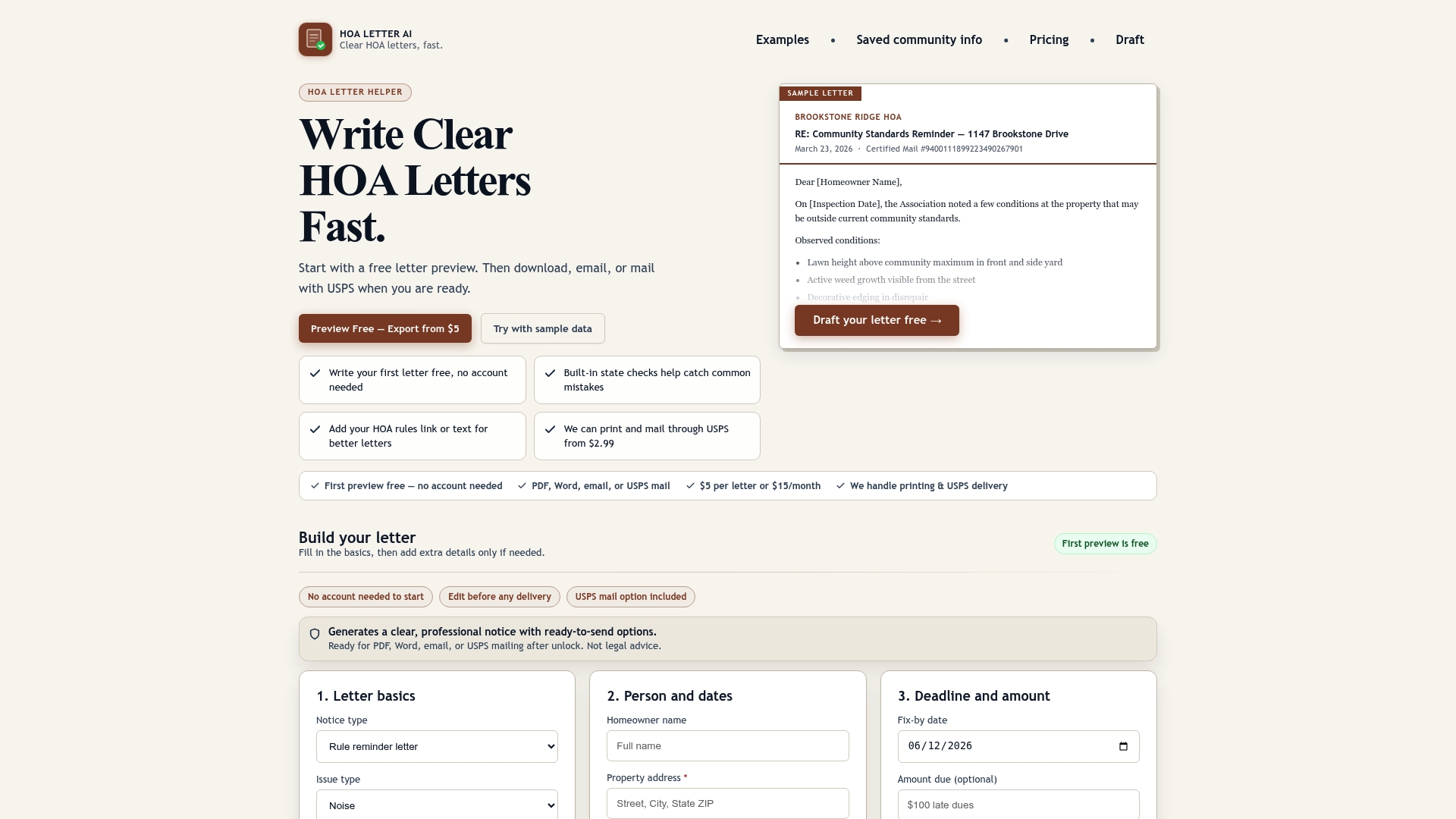
Every notice generated through HOA Letter AI carries a version-stamped template snapshot, a CC&R citation, and a delivery record tied to USPS tracking or portal acknowledgment. When an enforcement action is questioned, the evidence packet is already assembled. Property managers running multiple communities can use reusable community profiles to keep templates consistent across portfolios without rebuilding from scratch each time.
The property manager pricing page shows the full feature set for management teams. Individual boards can preview any notice for free before paying, and the HOA violation letter generator lets you see exactly what a state-aware draft you review looks like before you commit. Start with a free preview today and see how much of the manual tracking work disappears.
Sources
- Notice & Document Delivery to the HOA & Owners
- Community-Driven Crisis Response: A Workbook for Coordinators - CSG Justice Center
- Community Response Map (IOM)
- Irs
- Community response grid (CRG) academic paper
- Community Management During Volatility